
Court Deadlines began in 2017 as a collection of educational tools, including free deadline calculators designed to help lawyers, legal professionals, and self-represented litigants quickly calculate common court deadlines. These court deadline calculators are intended as practical starting points. They are not substitutes for reviewing the applicable rules, court orders, local rules, and other nuances that can affect how a deadline is calculated. Some court deadlines involve straightforward counting of calendar days, while others require applying additional procedural rules relating to weekends, legal holidays, or methods of service. Certain deadlines are particularly unique. For example, the Texas answer deadline under Texas Rule of Civil Procedure 99(b) generally requires more than simply adding a fixed number of days. Always review the applicable procedural rules before relying on a deadline calculation. Users should always independently verify deadlines.
Looking for a Simple Date Calculator?
Use our free online legal deadline calculator to add or subtract calendar days from any date.
Explore Court Deadlines by Topic






Court Deadlines was built by a practicing litigation attorney, but each deadline calculator is provided “as is” and may not account for the unique circumstances of a particular case. If you have questions about a filing deadline, consult the court clerk, court coordinator, or a qualified attorney in the relevant jurisdiction.
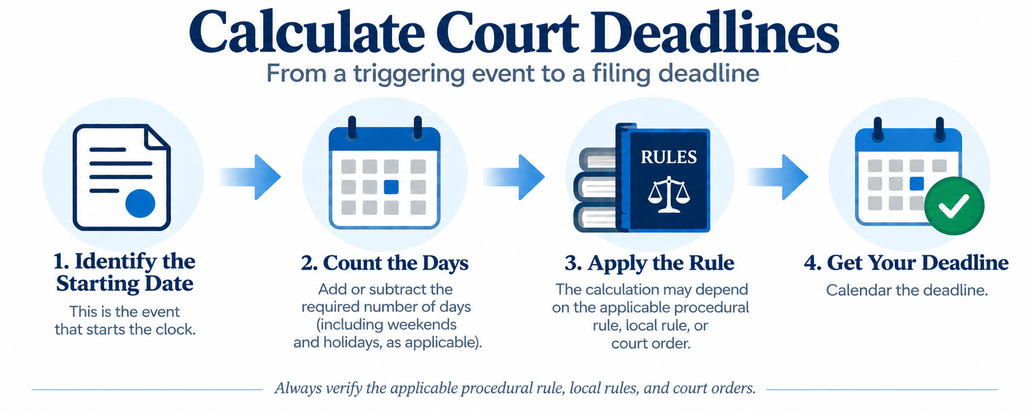
How to Calculate Court Days
To calculate court deadlines in federal court, follow these general steps:
- Identify the trigger date. This is the date of service, the filing of a motion, or another event that starts the clock.
- Count the required number of days. Move forward (e.g., deadline to file an answer) or backward (e.g., deadline to oppose a motion) from the trigger date.
- Adjust for weekends and holidays. If the deadline falls on a Saturday, Sunday, or legal holiday, move to the next business day.
- Always check your applicable rules and double check the deadline!
Popular Topics
Explore additional guides explaining how litigation deadlines work in federal and Texas courts.
Court deadlines are time limits established by procedural rules that govern how litigation moves through the court system. They determine when pleadings must be filed, when discovery responses are due, and when appellate deadlines expire. Missing a deadline can result in consequences such as waived defenses, exclusion of evidence, sanctions, or dismissal of claims.
Deadline calculations vary by jurisdiction and may require accounting for weekends, legal holidays, methods of service, local rules, and other provisions of the applicable procedural rules. State and federal courts also follow different rules for calculating certain deadlines.
CourtDeadlines.com provides calculators and reference materials designed to assist with these calculations. For a calculator, enter the applicable triggering date, such as a date of service, judgment, or order, and review the resulting date against the governing procedural rule.